1
2
3
4
5
6
7
8
9
10
11
12
13
14
15
16
17
18
19
20
21
22
23
24
25
26
27
28
29
30
31
32
33
34
35
36
37
38
39
40
41
42
43
44
45
46
47
48
49
50
51
52
53
54
55
56
57
58
59
60
61
62
63
64
65
66
67
68
69
70
71
72
73
74
75
76
77
78
79
80
81
82
83
84
85
86
87
88
89
90
91
92
93
94
95
96
97
98
99
100
101
102
103
104
105
106
107
108
109
110
111
112
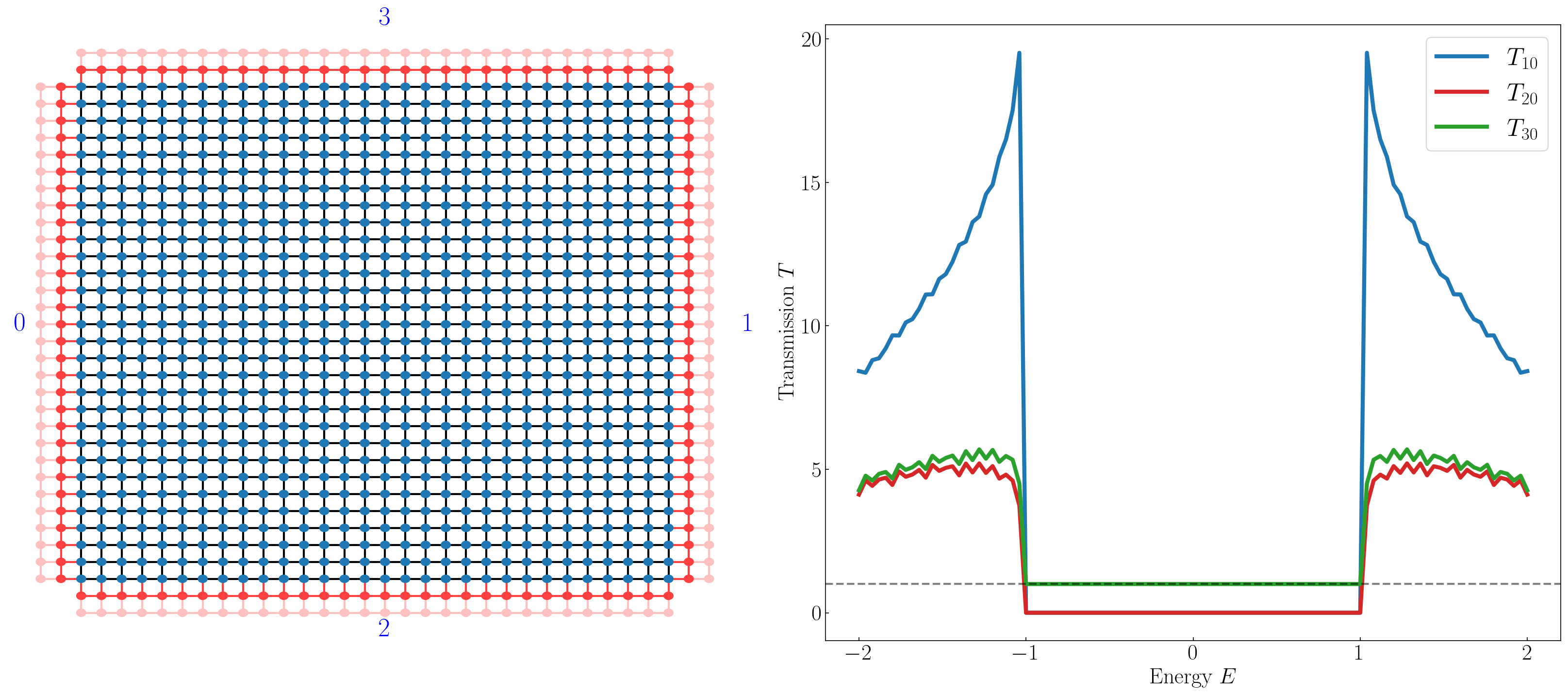
| import kwant
import tinyarray
import numpy as np
import matplotlib.pyplot as plt
import time
from multiprocessing import Pool, cpu_count
plt.rcParams['text.usetex'] = True
plt.rcParams['font.family'] = 'Times New Roman'
plt.rcParams['figure.dpi'] = 150
plt.rcParams['font.size'] = 22
plt.rcParams['xtick.direction'] = 'in'
plt.rcParams['ytick.direction'] = 'in'
sz = tinyarray.array([[1, 0], [0, -1]])
sx = tinyarray.array([[0, 1], [1, 0]])
sy = tinyarray.array([[0, -1j], [1j, 0]])
def make_syst(L=30, W=30):
m0, t, A = 1.0, 1.0, 1.0
lat = kwant.lattice.square(norbs=2)
syst = kwant.Builder()
onsite = (m0 - 2 * t) * sz
hop_x = 0.5 * t * sz - 0.5j * A * sx
hop_y = 0.5 * t * sz - 0.5j * A * sy
syst[(lat(i, j) for i in range(L) for j in range(W))] = onsite
syst[kwant.builder.HoppingKind((1, 0), lat)] = hop_x
syst[kwant.builder.HoppingKind((0, 1), lat)] = hop_y
lead_x = kwant.Builder(kwant.TranslationalSymmetry([-1, 0]))
lead_x[(lat(0, j) for j in range(W))] = onsite
lead_x[kwant.builder.HoppingKind((1, 0), lat)] = hop_x
lead_x[kwant.builder.HoppingKind((0, 1), lat)] = hop_y
lead_y = kwant.Builder(kwant.TranslationalSymmetry([0, -1]))
lead_y[(lat(i, 0) for i in range(L))] = onsite
lead_y[kwant.builder.HoppingKind((1, 0), lat)] = hop_x
lead_y[kwant.builder.HoppingKind((0, 1), lat)] = hop_y
syst.attach_lead(lead_x)
syst.attach_lead(lead_x.reversed())
syst.attach_lead(lead_y)
syst.attach_lead(lead_y.reversed())
return syst
def compute_transport(args):
fsyst, en = args
try:
smat = kwant.smatrix(fsyst, en)
return [en, smat.transmission(1, 0), smat.transmission(2, 0), smat.transmission(3, 0)]
except:
return [en, 0, 0, 0]
if __name__ == '__main__':
L, W = 30, 30
builder = make_syst(L, W)
fsyst = builder.finalized()
energies = np.linspace(-2.0, 2.0, 101)
n_cores = cpu_count()
print(f"Calculating on {n_cores} cores...")
with Pool(n_cores) as pool:
results = pool.map(compute_transport, [(fsyst, en) for en in energies])
res = np.array(results)
res = res[res[:, 0].argsort()]
fig, (ax1, ax2) = plt.subplots(1, 2, figsize=(22, 10))
kwant.plot(builder, ax=ax1)
ax1.set_axis_off()
port_labels = {
" 0": (-3, W / 2),
" 1": (L + 3, W / 2),
" 2": (L / 2, -3),
" 3": (L / 2, W + 3)
}
for label, pos in port_labels.items():
ax1.text(pos[0], pos[1], label, color='blue', fontsize=26,
fontweight='bold', ha='center', va='center')
ax2.plot(res[:, 0], res[:, 1], label=r'$T_{10}$', lw=4, color='tab:blue')
ax2.plot(res[:, 0], res[:, 2], label=r'$T_{20}$', lw=4, color='tab:red')
ax2.plot(res[:, 0], res[:, 3], label=r'$T_{30}$', lw=4, color='tab:green')
ax2.axhline(1.0, color='black', linestyle='--', lw=2, alpha=0.5)
ax2.set_xlabel(r'Energy $E$')
ax2.set_ylabel(r'Transmission $T$')
ax2.legend(fontsize=25, loc='best', frameon=True)
ax2.locator_params(axis='x', nbins = 5)
ax2.locator_params(axis='y', nbins = 5)
plt.tight_layout()
plt.savefig("half_bhz.png", bbox_inches='tight')
plt.show()
|







![超导自由能泛函(Ginzburg–Landau)推导[非均匀配对]](/assets/images/SC/SC-Free.png)